Mobile Apps
OneCal is available on iOS and Android, so you can see and manage your calendars, calendar syncs and booking links from your pocket. Everything stays in sync with the web app.
- Download for iPhone and iPad on the App Store.
- Download for Android on Google Play.

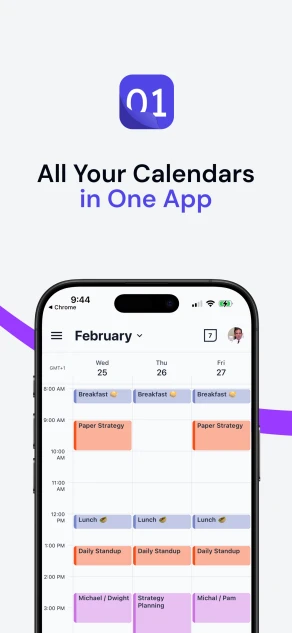
Unified Calendar View
Every event from every connected calendar account appears in one place, so you never switch between Google Calendar, Outlook and iCloud again.
- Switch between Day, 3-Day, Week and Month views.
- Toggle individual calendars on and off to focus on what you need.
- Navigate with swipe gestures, and pull down to refresh.
- All-day events, overlapping meetings and timezone labels are laid out so your schedule stays readable.
- Show up to 3 time zones next to the calendar, each with its own label. See Time Zones in the Calendar View.
- Hide clone events created by Calendar Sync, so each event appears once instead of once per calendar.
Manage your events
You get full event management on every connected calendar account, across Google Calendar, Outlook and iCloud.
- Create an event by tapping the + button, or by holding and dragging on a time slot to set a custom duration directly.
- Edit and delete events, including recurring ones. Choose whether a change applies to a single occurrence or the whole series.
- Search your events across every connected calendar. See Search Events.
- RSVP to invitations, with an optional note.
- Join Google Meet, Microsoft Teams and Zoom calls with a single tap.
When creating or editing an event you can set a location, a description, reminders, attendees and a video conferencing link, mark the event as busy or free, and configure a recurring pattern: daily, weekly, monthly, yearly or fully custom.
Reminders and attendees
- Set multiple reminders per event, from minutes to days in advance.
- Add attendees by email address, and track their RSVP responses.
- See at a glance how many guests are attending, are tentative, or have not responded.
Booking links and bookings
You can create and manage your booking links and handle incoming bookings from the app.
- Create, edit, duplicate and delete booking links, with the same settings as on the web: general setup, availability, hosts, limits, questions, prefilled details, private links, workflows, branding and advanced settings.
- Edit your booking page: change your username, description, social media links, global language and global branding.
- Upload images: add or replace the cover image of your booking page or of a single booking link, straight from your photo library. Images can be up to 5 MB.
- Manage availability schedules: create, edit and duplicate your schedules, including weekly hours and date exceptions.
- Manage workflows: create, edit and duplicate the workflows that send emails before and after your meetings.
- Preview how each booking link looks to a scheduler, and share it straight from your phone.
- See all your bookings, across upcoming, unconfirmed, past and cancelled, and confirm, reject or reschedule a booking with one tap.
- Get a push notification the moment something happens: a new booking, a booking waiting for your approval, a reschedule, or a cancellation. You find out without checking.
Calendar Sync
You can create and manage your calendar syncs in the app, just like on the web.
- Create one-way and multi-way calendar syncs, step by step: choose how to sync, pick the calendars, and choose the sync settings.
- Edit the settings of a calendar sync, or use Edit Calendars to change which calendars it covers.
- Duplicate a calendar sync to start a new one from its settings. See How to Duplicate a Sync.
- Re-run, pause and delete calendar syncs.
- See why a calendar sync failed: the app shows the reason and the calendar that is affected, together with what to do next. See Error Messages Explained.
Connect and organize calendars
- Connect calendar accounts on the go, including iCloud and CalDAV calendars such as Fastmail, Yahoo or Nextcloud.
- See a calendar's status, such as Not found or No access, when it needs your attention. See Calendar status tags.
- Toggle calendars on and off in the Unified Calendar View to focus on the ones you need.
Good To Know
A few things are still set up on the web app, such as connecting Zoom and other integrations, managing your team, and paying for a team plan.
See your team
View your team members' events alongside your own, so you can tell who is free and plan across time zones without leaving the app. See See Team Members' Availability.
AI assistant
The app includes an AI assistant you can chat with about OneCal and your calendars. Ask it how a feature works, what is on your schedule, or for help with anything OneCal related, and it answers in the app.
Learn more about the AI Assistant
Notifications
The app sends push notifications for three kinds of things. All three are off when you install the app. To turn one on, open the app's Settings, go to the Notifications section, and switch it on. The first time, your phone asks you to allow notifications from OneCal.
- Event reminders: A push notification before an event starts. The timing follows the reminders set on the event itself. If the event has no reminders, the app uses the default reminders of the calendar the event is on. For example, if a Google Calendar event reminds you 10 minutes before, your phone notifies you 10 minutes before.
- Booking notifications: A push notification the moment something happens on one of your booking links: a new booking, a booking waiting for your approval, a reschedule, a cancellation, or a declined booking. Tap the notification to open that booking in the app, where you can confirm, reject, cancel or request a reschedule.
- Product updates: A push notification when OneCal ships a new feature or a meaningful improvement. Tap it to read the announcement in the app. We send these rarely.
Notification text is shown in the language you use OneCal in.
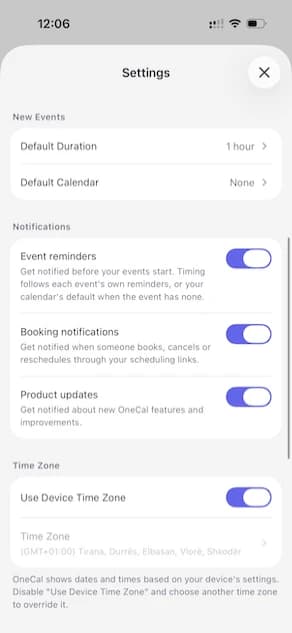
Preferences
Make the app yours under its settings:
- Appearance: light, dark, or follow your system theme.
- Language: the app is available in several languages.
- Time zone.
- Hour format: 12-hour or 24-hour.
- First day of week.
- Default duration for new events you create from the Unified Calendar View.
- Default calendar for new events and new booking links. It is saved to your OneCal account, so it is the same on the web. See Set Your Default Calendar.
- Time zones shown next to the calendar.
Subscriptions
You can buy your OneCal subscription directly in the app, through the App Store or Google Play. See App Store and Google Play Subscriptions for how mobile billing works, and how it differs from paying on the web.
Privacy and security
OneCal connects to your calendar accounts over OAuth2, so we never store your passwords and never analyze your calendar data. Your information is encrypted in transit and at rest on AWS infrastructure, and we request only the minimum permissions each provider requires. For SOC 2, GDPR and our security resources, see Security and Privacy.