Abrechnung und Pläne
Abonnement kündigen
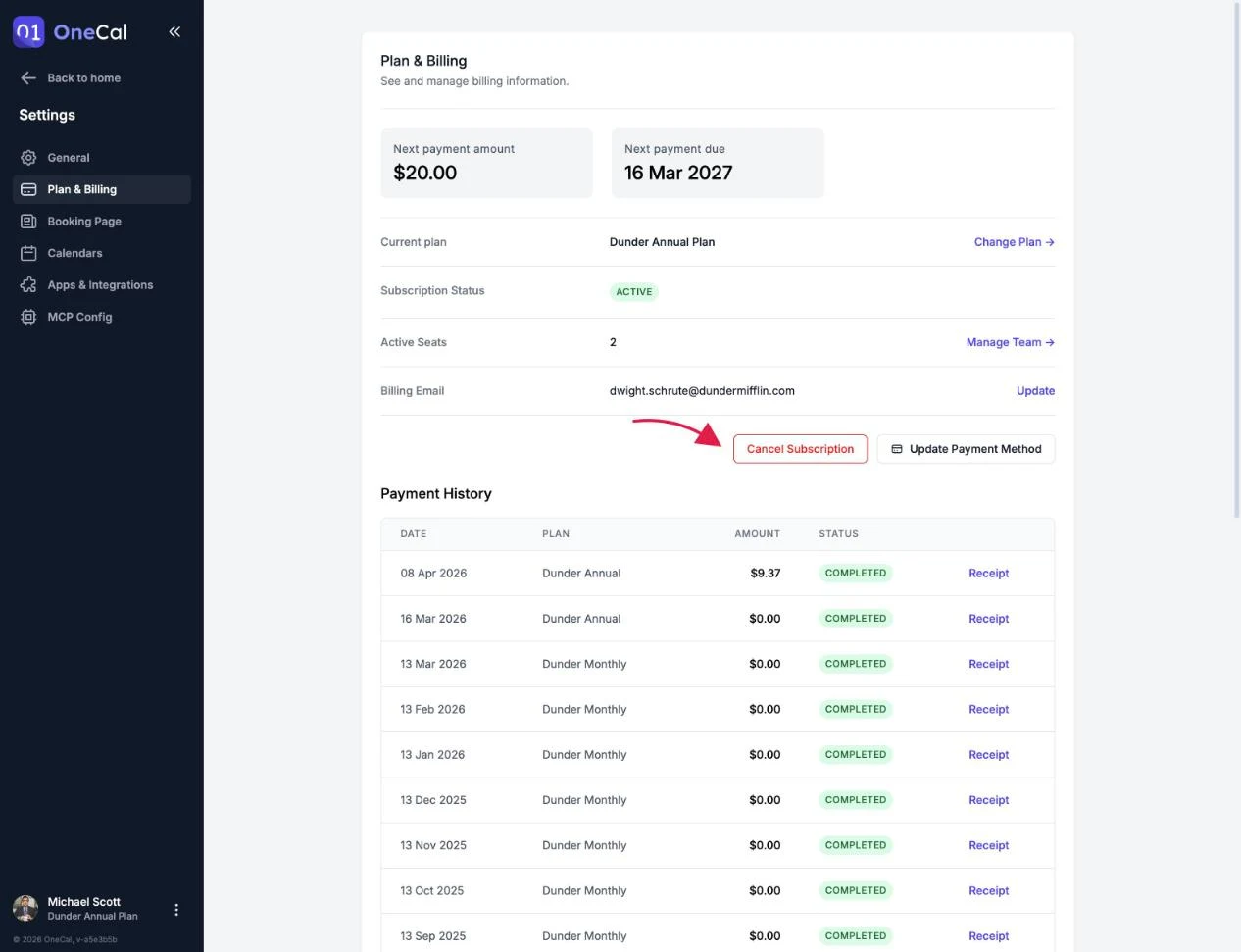
Sie können Ihr Abonnement jederzeit unter Einstellungen → Plan & Abrechnung kündigen.
- Klicken Sie auf Abonnement kündigen.
- Teilen Sie uns mit, warum Sie gehen. Ihr Feedback hilft uns, OneCal zu verbessern.
- Bestätigen Sie die Kündigung auf der sicheren Paddle-Seite, die sich öffnet.

Gut zu wissen
Wenn OneCal nicht wie erwartet funktioniert, geben Sie uns die Chance zu helfen, bevor Sie gehen. Kontaktieren Sie den Support und unser Team antwortet innerhalb von 24 Stunden.
Wann endet der Zugriff
Die Kündigung beendet Ihren Zugriff nicht sofort. Ihr Abonnement bleibt bis zum Ende des bereits bezahlten Zeitraums aktiv. Das genaue Ablaufdatum wird auf der Seite „Plan & Abrechnung" angezeigt, und Ihr Abonnementstatus ändert sich zu Gekündigt.
Nach der Kündigung werden Ihnen keine weiteren Zahlungen berechnet.
Was passiert, nachdem das Abonnement abgelaufen ist
Sobald der bezahlte Zeitraum endet:
- Alle Kalender-Synchronisationen stoppen und zeigen den Status Abonnement abgelaufen, und die Klon-Termine, die OneCal erstellt hat, werden aus Ihren Kalendern entfernt. Ihre Originalereignisse werden niemals angetastet.
- Alle Buchungslinks werden deaktiviert, sodass niemand mehr Zeit mit Ihnen buchen kann.
- Öffentliche Kalender-Feeds funktionieren nicht mehr. Personen, die Ihre Feed-URL verwenden, sehen Ihre Ereignisse nicht mehr.
Zurück zu OneCal
Sie können jederzeit unter Einstellungen → Plan & Abrechnung erneut abonnieren, indem Sie einen Plan auswählen. Sobald Ihr neues Abonnement aktiv ist:
- Ihre Synchronisationen werden automatisch fortgesetzt, und die Klon-Termine werden neu erstellt.
- Ihre Buchungslinks werden wieder aktiviert.
- Ihre öffentlichen Kalender-Feeds funktionieren wieder.
Ihre Synchronisationseinstellungen, Buchungslinks und Einstellungen bleiben erhalten, sodass Sie genau dort weitermachen, wo Sie aufgehört haben.